

Why you should use Google Keyword Planner in your marketing
Date of publish:


Wonderful creature DRAGON


Introduction
Are you looking for new and fresh keyword ideas to grow your site’s organic traffic? Do you need help creating outstanding and engaging content? Look no further: Google Keyword Planner, formerly known as Google Keyword Tool, will spare you all the hassle and rid you of daunting tasks when you navigate keywords.
Why is keyword Planning important?
Google Keyword Planner is like a weather forecaster but in marketing. If your goal is to be ranked highly by Google, run a thriving campaign – Keyword Planner will lay the groundwork for you.
To stifle the uncertainty, here are the benefits:
- Brand new keywords for various products, services, or websites.
- Monthly searches monitor how your business is going.
- Determine cost: the cost of an ad shows how keywords appear in searches.
- Structure shows if keywords are a fit to different brand categories.
- Brand new campaigns guide you through thorough research to create unique campaigns.
How do I get Google keyword planner?
Google keyword planner is a free tool. On top of that, Google’s keyword planner gives an average monthly search volume. However, here is a catch – to use a keyword planner tool you need to have an Ads account.
Google Ads Keyword Planner is a good tool to get the ball rolling in your business. It can be easy and fast to set it up, just bear in mind some details.
Set up Google Ads account
Regardless of the goal, Google keyword planner still asks all users to set up an Ads account. You sign in as usual, but you will be asked to add credit card information.
In any case, you will have to provide this information. If you have no intention to run ads, go to your ad settings and pause this action.
How to access Google Keyword planner
Keyword planner gives you three tool options: “Discover New Keywords”, “Get search volume and forecasts” and “Organize keywords into ad groups”. Those will be enough to build a proper SEO strategy and discover new keywords for your business.
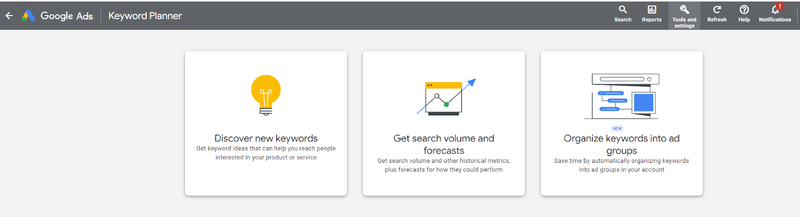
The first option, “Discover New Keywords”, can increase your website traffic with unique keyword ideas. With the second option, “Get search volume and forecasts” you have access to search volume data, and in-depth keyword research. With “Organize keywords into ad groups”, you can let Google automatically create ad groups from the keywords you upload. Do keep in mind that this one currently only works with English.
How to Discover New Words?
GKP is a useful tool if you want to build a strong keyword list in multiple search networks or expand your list of negatives. Let’s take a look at the first option to find out how to get new keyword ideas, relate keywords to your potential customers and audience, and make everything relatable for the search network.
When you click on “Discover New Keywords” you receive two more options: Start with Keywords and Start with a Website.
Start With Keywords
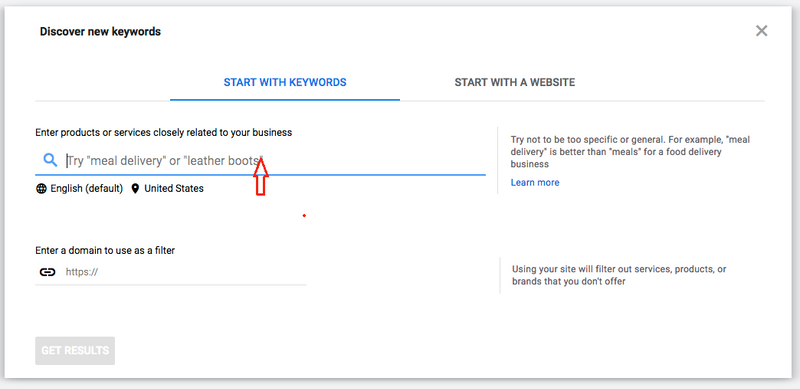
In said section, you can enter words or phrases suggested to the topic of your blog post, article, or ad, to get desired keywords on Google’s internal database in various fields and industries.
Tip: add up to 10 keywords related to your need to get a broad match of keywords. However, try not to get carried away and be either too general or too specific. Look for a middle ground for your target keywords.
Start With a Website
For this option, you can enter the website URL to find specific keywords. Google keyword planner scans the entire site through special search patterns and returns individual keywords for your purposes.
What’s more, the keyword planner shows you the keywords that your competitors are actively using. This gives you an idea of how to boost your content with individual keywords and make your product pop.
Search volume and keyword forecast
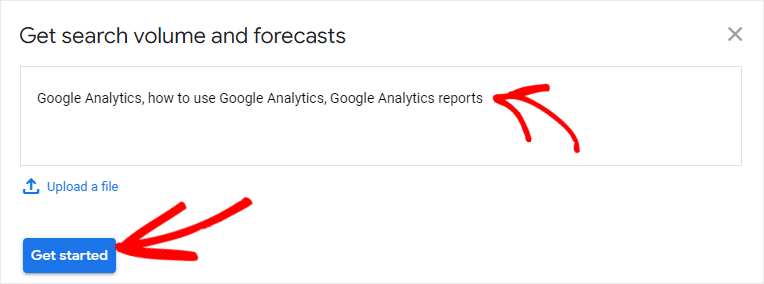
Do you have a keyword list? Are you curious about how a search volume of prepared keywords works? This option would be the answer to these questions. Remember: you will not be able to find any new keywords, just understand your situation in general.
Here you can get:
Data on the created list of keywords. Keyword planner is truly a handy tool because it shows monthly searches for keywords. With such valuable statistics, you can see which keyword ideas are paramount and will attract your target audience.
Note: there are certain keywords that are frequently used by people when they describe some products. You can exclude keywords that you think are unnecessary to show that you truly care about your audience, product, and campaign.
Another point of keyword research is strategy. Search volume can guide you through broad or specific keywords according to your strategy, and focus on the product.
Potential cost-per-click statistics from Google. Keyword planner is a versatile tool that provides the average cost for an ad on keyword searches. When you get PPC (pay-per-click) statistics, choose keywords that fit the budget, strategy, and target.
Remember: the cost of ads depends on a multitude of factors. So, if monthly searches are higher, the costs will be high as well due to the big competition of such keyword suggestions. And if the average monthly searches are lower, so will the cost. But if PPC is not so demanding, it does not mean that keywords will not do a proper job. Every kind of eCommerce business is unique and different cases have different exceptions.
Organize keywords into ad groups
As you could have figured out, PPC advertising is a tricky process. With a keyword planner, you can optimize the ads and increase conversion. Sounds perfect, doesn’t it? Get a step-by-step guide on how to do it below:
Begin with a sign-in to your Google Ads account.
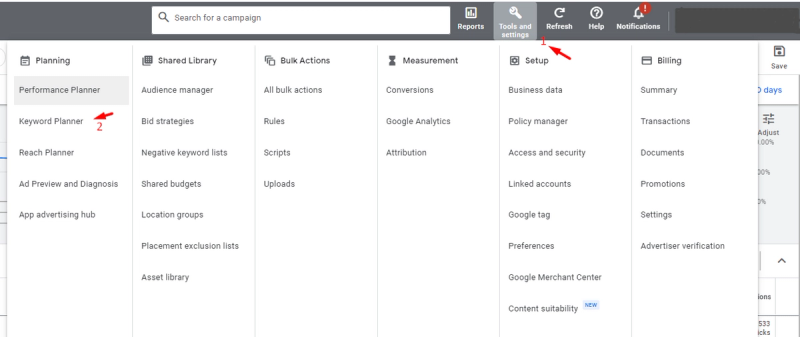
Then, click on the wrench icon under “Planning” and choose Keyword Planner.
After, start to Organize keywords into ad groups. You will have 3 options to manage them:
- Start with keywords. Enter words associated with your products or services.
Tip: separate long keyword search queries with a comma and a space.
Pro tip: if you enter your domain Google will exclude unrelated keywords.
- Start with a website. Enter the website’s URL and get relevant keywords for your content.
- Upload or paste. Upload a file yourself or enter the keywords manually. Google Keyword Planner will organize the keywords into ad groups. If you wish, you can do the latter yourself.
Having organized the keywords in the way that works for you, click on Auto-organize keywords.
This option gives a list of ad groups with keywords suggestion. Keyword Planner will target the most related ad groups to get well-performing campaigns.
The bottom line is that you can check the accuracy and perform the final touches with editing. All changes will be uploaded to the account only when you choose to do so.
How to use Keyword Planner Effectively
More Keyword ideas for the Keyword Planner tool
When you begin using Google keyword planner you are only allowed to work with ten keyword ideas. However, having mastered a keyword tool you feel the need to go beyond the limit and you can.
To overcome the obstacle try adding keywords manually one by one, do not do the whole list. When adding an unlimited number of keywords choose the option “select all” (meaning all new keywords that you have written down), and “add to plan”. It is quite effortless.
Bonus: added keyword suggestions will be within the historical tab. Such a tab – the historical search – comes in graphs and states the popularity of keywords throughout the years. Use it to make your content more relatable and up-to-date.
Better search volume data
As mentioned before, you need to be careful with data and check everything due to the fact that Google gives only a rough estimate these days. Be ready to make some adjustments if you are tired of low search volumes.
The main correction is – Maximize Cost-per-click impressions
Start off by adding keywords to your own plan. Arrange keyword ideas in a list and manually enter them in the “Get search volumes and metrics” tool. If you receive some prompts from the “exact match” option, do not hesitate to add them to your list. In the Keywords view you will see the following information:
-How many clicks your plan can get
-How many impressions you can get
-How much money the number of clicks will cost
-The average CPC (Cost-per-click)
-The maximum CPC
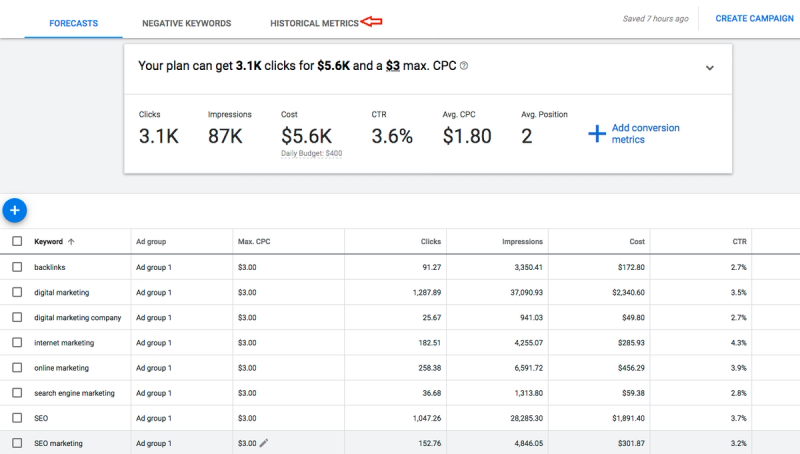
Pay attention to “Impressions” since it is the estimated number of impressions your ad can get if you run it with the chosen keywords. Also, make sure to set your CPC as high as possible, and your data on the monthly search volume will not be far off.
Naturally, the real results may differ, but you get the general picture.
Be inspired by competitors
Remember that Google Keyword Planner can generate keywords from websites’ URLs? Do not be shy, try to find the secret to why your competitors might be doing better than you.
For that, you need to copy their URLs, paste and select to scan the whole site. In case of too many keyword suggestions – filter them.
This is a good practice to find keyword ideas and potentially change your strategy to make your content more noticeable.
What is the public asking?
A true SEO hunter is eager to know what the audience is asking. In order for a marketing strategy to work – mold your service for the primary audience.
You will not need extra tools – the keyword planner can meet this goal. Start with: Filter -> Keyword text -> contains -> enter: who, what, when, where, how.
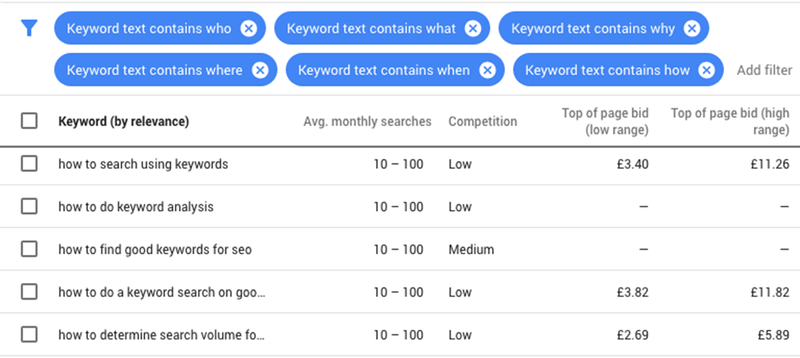
Do it for all six positions. Sure, the list will be a huge one but you can create an ad group to filter it. This way, you can export the queries and keep on working with the organic immersion of keywords in the text.
This tactic is useful in creating an invisible bond with a target audience.
Profit-making keywords
Scratching the back of the head while looking at your content? Wondering why ads are not attracting any audience? Spicing your blog post or website with keyword suggestions and the aftertaste is still bland?
“Top of page bid (high range)” column will take your sorrows away. Never heard of “Top of page bid (high range)”? No worries, it is a unique tool that shows the higher range of what advertisers have paid for the keyword’s top-of-the-page bid, based on location and search network settings.
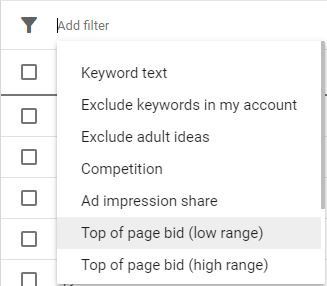
The data shows particular keywords which have high bids, hence high sales. Any keywords which can convert cool leads to sales are worth a place in your keyword list.
Remember to filter out keywords from high to low value. The former value suits commercial purposes, and the latter fits informational ones. However, do not be afraid to experiment with potential keywords and values.
Next, do a Google search to see if other companies, in the same niche as you, are actively using those keywords. In case of a positive scenario – use them without any hesitation.
Localize your SEO
“Go big or go home” – that’s what they tell you in those motivational sessions. But you will never reach the stars unless you start with something small and attainable.
Your business begins with something small too: be it a cozy coffee shop in the neighborhood, or utility service in the local area, or a start-up in the city. Your business must sell to the real people around you first.
These days people shower Google search with questions like: “buy organic soap in Los Angeles”, “plumber near me”, “cheap Air B&B in Hell’s Kitchen”.
However, keyword research tools are not able to tell the number of people who inquire about a term in local areas, towns, and cities, or even states and districts.
The only available data is for the entire country. The outcome – such vague search volumes are useless in marketing strategies to the local SEO.
With Google Keyword Planner you can receive the estimated impressions for localized areas:
- Adjust the search location
- Add the name of the city
- Go to Location option
- Type the name of the city
- Set the city as a target
Having done an additional setup for any place you need to, you get related data for asked locations. With this method you can get an idea of the maximum number of searches for the keyword.
Moreover, with the described feature you can understand who your audience is, how you must create content, and what keyword ideas to develop.
Besides, you should never turn a blind eye to a potential audience. Always get them on the radar of a marketing strategy.
Which devices are used by the audience?
With many different gadgets nowadays, you can read an article or see a pop-up when surfing the net on a PC, laptop, tablet, smartphone, and even Apple watch.
However, the most frequent choices are laptops, tablets, and smartphones, which require additional optimization.
Usually, desktop and mobile versions are compared and keyword research tools indicate the following differences:
– Different sizes of text
– Smaller size of numbers
– Shrunken buttons
Pay extra attention to the content of a mobile version. A keyword planner, with the right settings, can give you plenty of insights into how devices are used to search for special keywords.
For that, go to “Plan overview” to get acquainted with demands for mobile, tablet, and desktop metrics and see how they are compared across others.
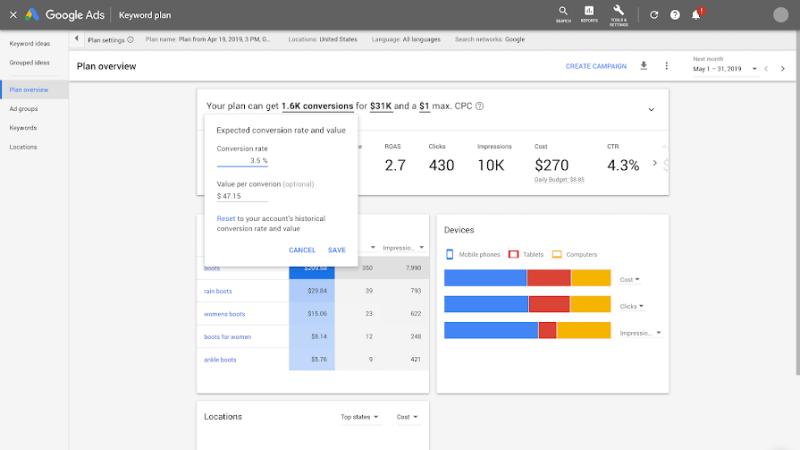
There you can search which keywords to prioritize according to the query time, the probable situation when it is asked, and the time it takes to solve the problem.
For instance, “The best vegan restaurant in Bronx” is a type of query which will be googled from the phone, according to a high percentage of impressions. A person is craving food, and they need an instant answer.
Therefore, optimize and prioritize a PPC campaign for a mobile version with a keyword planner to make your product more visible and reachable.
Is Google keyword planner good for SEO?
In short, SEO, Search Engine Optimization, is designed to make your website stand out to your target audience. Even though Google Keyword Planner was solely designed for Google ads, it still can be an effective tool for keyword research.
Google keyword planner tool is a must in search engine marketing. Google keyword planner is a great option for beginners, small businesses, or companies with a low marketing budget.
Said planner is easily aligned with Google ads if your goal is to run cost-per-click/pay-per-click campaigns. In either case, a keyword planner will help to build SEO-friendly content.
Keyword research
A keyword plan is the fundament of efficient SEO. Finding keywords looks easy only on paper, but it takes dedication, knowledge of the field, and a lot of research.
Start from scratch and ask yourself who your online audience is. The choice of keywords entirely depends on people, businesses, products, and services. Hence, having analyzed the audience you, can limit an endless list to the right keywords.
Keyword optimization
With a diligently composed keyword list, switch to keyword optimization. Begin with analyzing an entire site for keywords that are an exact match with your target audience.
Make sure to create a carefully structured keyword text, so that it’s catchy and engaging for your audience as well as search engines.
Various factors
Search engines are constantly advancing to use more keywords in the algorithm. Pop-up ads and other additional features may contradict SEO tools. Keep in mind: putting potential keywords in organic positions can neutralize any obstacles.
Advantages of Google Keyword Planner

Like any other tool, Google Keyword Planner has its pros and cons. As practice shows, you will not see any big disadvantages. Let’s review why:
Fact: Google Keyword Planner has recently undergone some changes and only provides average monthly data since not so long ago. However, we described different approaches in our article on how to get the most out of the keyword planner and receive specific data for your needs.
No pain no gain. To the dismay of others such filters as “broadly related ideas” and “closely related ideas” were removed from Google Keyword Planner back in 2019, which allowed SEO experts to go through various keywords and statistically opt for some special ones.
But now there are many other features that can come in handy: localizing keywords, researching the audience and even following a modern trend ”mobile first” when creating keyword ideas.
Google keyword planner is an effective tool for any business since it finds only the most relevant keywords for a marketing strategy to run successfully.
Broad amount of data, historical tabs for keywords, organic ad impressions, and even average bid prices – all of that you can get with just one tool.
Sure, there might be many pitfalls with this keyword research tool, but the best advantage is that is it free to use and anyone can learn how to use it for their purposes. Plus, deep knowledge of keyword research techniques will make your marketing strategy one of the best.
Extra bonus: There are all kinds of pages you can work with using these Google Keyword Planner features:
-Blog posts
-Press releases
-Conference agendas
-Bio pages of influencers in your industry
-News stories
-Podcast transcripts
In short, you can get a fair SEO game for your texts with this technique.
Final thoughts
Google Keyword Planner is a powerful tool indeed. It is beneficial for your research workflow, well-coordinated work with your SEO team, and PPC campaigns.
With some extra tweaks in Google keyword planner, you can unleash the true power of this tool and use it for any needs your business requires. Google keyword planner will help you choose the best keywords to rank your content at the top of every search. Need any extra help? We’d be glad to give you a hand.
Get a weekly email to amplify your
e-commerce sales.
Over 10000 companies already in the list!