

Setting up product data feeds for Google Shopping using DataFeedWatch
Date of publish:


Wonderful creature PHOENIX


Introduction
Having an effective feed for Google Shopping can increase the number of visitors to your online store and your products listed on the Google Search results pages (and beyond). When you have well-structured data in your Google Shopping feed, customers are able to find your products easily, thanks to the prominence of your goods in Google Shopping results pages. Using Data Feed Watch can make the organizing part a little easier.
When we were looking for methods to increase ROAS and had to optimize and scale the client’s product campaigns in a large-scale project on platforms like Google and META (Facebook), the idea of using a tool like DataFeedWatch (DFW) came to us. In this article, we want to share our experience.
The product feed for Google Shopping required significant improvement, which was hard to implement using only Google Merchant Center settings, without automation solutions that would allow us to:
- Get approval on the product feed to show the maximum possible number of products to the potential customers (the client has a pretty large volume of products to optimize that may be of interest to different audiences);
- Gain a detailed understanding of which product segments are more popular;
- Provide discounts for products from time to time;
- Bring more traffic and purchases to the site from specific channels, while considering that the client has discounts on products from time to time;
- Never have an empty title; rather, replace it with the ID file, which contains additional parameters to make sure products are available via advertisement channels;
- Customize descriptions in the product feed to A/B test and pass moderation for most products.
Below, we describe each setting to manage feeds and product data in detail:
Customize titles and descriptions
It is super easy to configure specific rules for the product data feed to customize titles, descriptions, etc. for products in DFW for multiple channels. For example, in case you need to fix empty fields, add extra details in these fields, correct information, or replace it with different details.
There may be gaps or things that require improvement in your product data feed, and the great thing about DFW is that you can quickly fix this with the help of additional functions.
This makes DFW a must-have tool when you customize your data for a variety of channels, such as Shopping channels on Google Ads, Pinterest, Catalog on META (Facebook), and Snapchat. It requires applying complex rules and adding more information from your website as all these things are a part of the process of boosting your advertising campaigns on any channel to the next level.
Alternatively, if you have to add more information to the product feed (e.g., if the title looks too short), you can easily supplement it with this rule. This way, you’ll never have an empty field, because you can just set it up based on your needs with the help of a file that contains additional parameters.
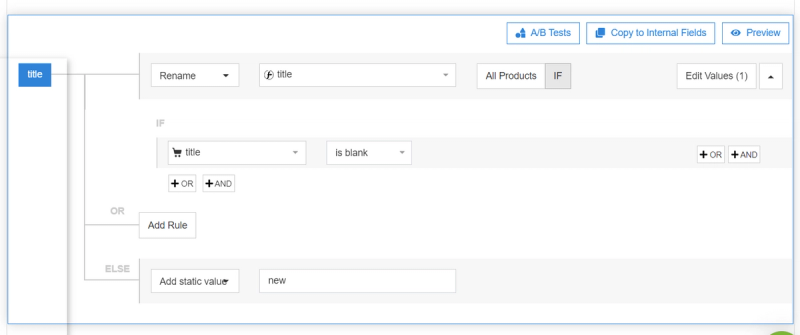
Try to include more information in the title to cover more people. A certain connection exists between the product title and the user request. The title should contain possible product variants, and you can ensure this with the DFW tool.
Click on Edit Values for the Title field.

Add the brand name as the prefix.
Add additional fields like color or collection of your product using the Combine tool and choosing the separator.
Get a weekly email to amplify your
e-commerce sales.
Over 10000 companies already in the list!